Skip to content
Skip to main content

Find relevant literature faster, set up searches with PubMed | workshop Wed., 8/10 at 2pm

pubmed

pubmed graphicPubMed is the National Library of Medicine’s index to the medical literature and includes over 22 million bibliographic citations in life sciences. This one-hour session will show you how to improve your search results by using subject headings (MeSH) and advanced keyword searching techniques.

picture fo Janna Lawrence

Janna Lawrence, Deputy Director

Our next session:
Wednesday, August 10, 2:00 – 3:00 pm (Information Commons East)
Instructor: Janna Lawrence, Deputy Director, Hardin Library

No time for class?  Check out tutorials and help or request a personal session!


Organize your references, store full-text using EndNote Desktop | workshop Thursday 8/11, 10am

endnote-nieuw

endnote_logoEndNote is a reference management tool that helps you to easily gather together your references in one place, organize them, and then insert them into papers and format them in a style of your choosing. This session will walk you through the basics of using EndNote to collect and format your citations.

EndNote can also store full-text articles if the library has an electronic subscription.  The class will be hands-on and there will be time for questions at the end.

EndNote Desktop is available free to faculty, staff and graduate students from ITS.

Our next session:
Thursday, August 11, 10:00 – 11:00 am (Information Commons East, Hardin Library)

No time for class?  See our guide to EndNote Desktop.

Change EndNote Desktop Settings to Find Full-text

The UI Libraries migrated to a new library catalog in July.  This change means you need to change your EndNote settings in order to find full-text articles. Below are instructions on how to make the changes on a PC. For more instructions on using EndNote, visit the website (EndNote Desktop tip sheet for PCs | EndNote Desktop tip sheet for Macs) or contact your librarian. Full text availability is limited to journals the UI Libraries subscribe to electronically which have full text available.

Set up EndNote to Find Full-Text

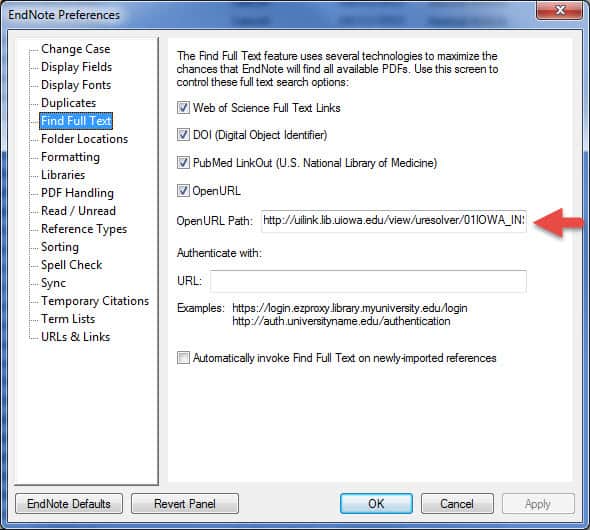
  1. From the Edit menu, select Preferences
  2. Click on Find Full Text.
  3. In the Open URL Path box, enter http://uilink.lib.uiowa.edu/view/uresolver/01IOWA_INST/openurl
  4. If you are using EndNote from off-campus, you will need to enter https://proxy.lib.uiowa.edu/login beside the box labeled Authentication URL.
find full text EndNote
Enable UILink (formerly InfoLink)
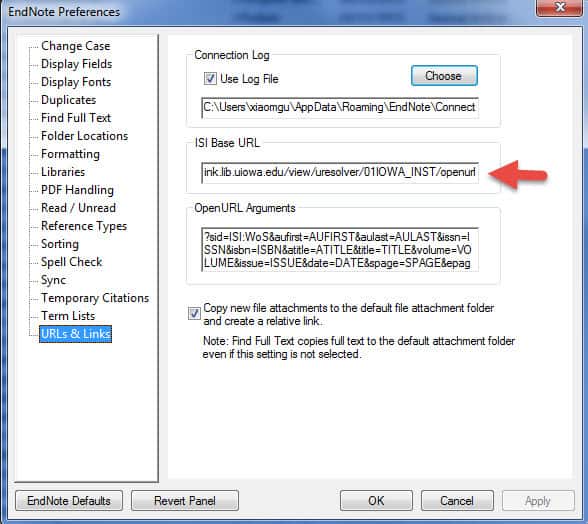
  1. From the Edit menu, select Preferences
  2. Click on URLS and Links
  3. Paste http://uilink.lib.uiowa.edu/view/uresolver/01IOWA_INST/openurl into the box labeled ISI Base URL.  You can now click OK.screenshot from EndNote


Change EndNote Desktop Settings to Find Full-text

The UI Libraries migrated to a new library catalog in July.  This change means you need to change your EndNote settings in order to find full-text articles. Below are instructions on how to make the changes on a PC. For more instructions on using EndNote, visit the website (EndNote Desktop tip sheet for PCs | EndNote Desktop tip sheet for Macs) or contact your librarian. Full text availability is limited to journals the UI Libraries subscribe to electronically which have full text available.

Set up EndNote to Find Full-Text

  1. From the Edit menu, select Preferences
  2. Click on Find Full Text.
  3. In the Open URL Path box, enter http://uilink.lib.uiowa.edu/view/uresolver/01IOWA_INST/openurl
  4. If you are using EndNote from off-campus, you will need to enter https://proxy.lib.uiowa.edu/login beside the box labeled Authentication URL.
find full text EndNote
Enable UILink (formerly InfoLink)
  1. From the Edit menu, select Preferences
  2. Click on URLS and Links
  3. Paste http://uilink.lib.uiowa.edu/view/uresolver/01IOWA_INST/openurl into the box labeled ISI Base URL.  You can now click OK.screenshot from EndNote


Change EndNote Desktop settings to find full-text

endnote-nieuw

The UI Libraries migrated to a new library catalog in July.  This change means you need to change your EndNote settings in order to find full-text articles.  Full text availability is limited to journals the UI Libraries subscribe to electronically which have full text available.

Set up EndNote to Find Full-Text:

1.    From the EndNote X7 menu, select Preferences.
2.    Click on Find Full Text in the left frame.
4.    If you are using EndNote from off-campus, you will need to enter https://proxy.lib.uiowa.edu/login beside the box labeled Authentication URL.


Finding a Hidden Gem

Wednesday, August 3, 2016

20160726_131745Finding a hidden gem makes Book Repair Supervisor Susan’s day fun. While repairing a book spine, Susan discovered this stiffener (liner) inside the spine; spine liners often were cut from scraps of paper, sometimes unused pages from books already produced by the bindery. The book she was repairing was published in 1926, so the paper liner is older.
20160726_13250720160802_144109

Finding a Hidden Gem

Wednesday, August 3, 2016

20160726_131745Finding a hidden gem makes Book Repair Supervisor Susan’s day fun. While repairing a book spine, Susan discovered this stiffener (liner) inside the spine; spine liners often were cut from scraps of paper, sometimes unused pages from books already produced by the bindery. The book she was repairing was published in 1926, so the paper liner is older.
20160726_13250720160802_144109

Finding a Hidden Gem

Wednesday, August 3, 2016

20160726_131745Finding a hidden gem makes Book Repair Supervisor Susan’s day fun. While repairing a book spine, Susan discovered this stiffener (liner) inside the spine; spine liners often were cut from scraps of paper, sometimes unused pages from books already produced by the bindery. The book she was repairing was published in 1926, so the paper liner is older.
20160726_13250720160802_144109

Andrés de Laguna de Laguna | August 2016 Notes from the John Martin Rare Book Room @Hardin Library

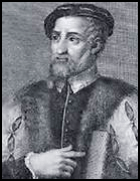
Andrés Laguna

ANDRES DE LAGUNA (1499-1560). Anatomica methodus, seu De sectione humani corporis contemplatio. Paris: Apud Ludovicum Cyaneum, 1535. 
Andrés Laguna

Andrés Laguna

Laguna, a native of Segovia, Spain, began his education in medicine at Paris in 1532. While in Paris he published his first three books and became acquainted with Vesalius.

By 1539,  Laguna published over 30 books, many on medical botany–one of his great interests. This work is one of his earliest and was simultaneously published in Paris by Jacob Kerver.  Laguna notes in the dedication that he spent only three months preparing the work and comments that, in his view, the medical profession of his day had fallen to a very low state.
picture from anatomy book

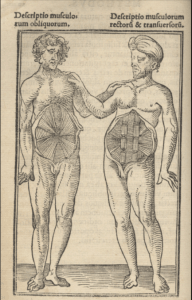
from Anatomica methodus, seu De sectione humani corporis contemplatio by Laguna

Written in a forthright manner, the book has a strong personal tone and cites few authorities but generally supports the views of Aristotle and Galen. Laguna begins his anatomy with the mouth because that is where the nutritive process is initiated and finishes with the brain where the spirits receive their complete transmutation. He cites few personal observations or autopsies and adds little to the progress of anatomy.

You may view this book in the John Martin Rare Book Room, Hardin Library for the Health Sciences.  Make a gift to the Hardin Library for the Health Sciences by donating online or setting up a recurring gift with The University of Iowa Foundation.

View a digital version of this book from Complutense University of Madrid.