Skip to content
Skip to main content

Find out how to measure your scholarly impact with our workshop Wednesday, Sept. 16

This class will teach participants how to use tools such as Ulrich’s, Journal Citation Reports, Web of Science, and Scopus to determine the impact that journals, articles, and authors have had on a particular field. Topics such as impact factors, Eigenfactors, and H-indices will also be discussed.

Instructor Amy Blevins

Instructor Amy Blevins

Wednesday, September 16th, 10:00 – 11:00am (Location: East Information Commons)

Register online or by calling 319-335-9151.

DIY for the Weekend! A Home Energy Audit

Classes have started, football season is here – as much as we hate to admit it – fall (and winter!) are upon us. Maybe it is time to look at how much – and where – our living spaces use energy. This may not sound like a fun way to spend a weekend, but think of the money you could be saving! If you leave in a dorm or rent an apartment, you may not think these energy tips pertain to you, but there are many things you can do to help shrink your carbon footprint.

How many times did your parents tell you to “turn off the lights” when you left a room?” They were right – turning off lights when not in use can save a lot of energy. One way to do that is with a timer – not only with lights, but with appliances you know you use at a certain time each day. Dimmer switches, energy efficient light bulbs and, if you live in a home, motion detectors also can save a significant amount of energy/money. Another trick is to keep your lamps away from the thermostat – the heat from the lamp can cause the air conditioner to run more frequently. A programmable thermostat, much like a timer switch, can also save energy and money.

Power_Monitor

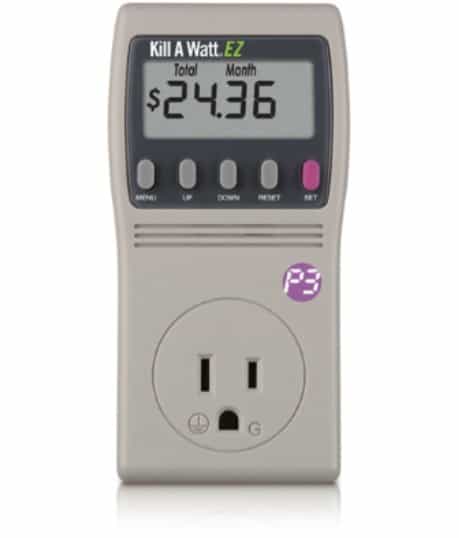
Power Monitor. Tool Library Box XX

Another thing you might want to do is figure out how much energy it takes to run the major appliances in your home. There are tables that can help you estimate costs for a home, but why not use the Power Monitor from our Tool Library. The power monitor will help you discover your “phantom” electrical use. Many household devices use power, even when turned off. It is easy to use – plug the power monitor into the wall socket and then plug the device into the power monitor. It measures the power usage for the entire time it is plugged in. An easy fix for using too much electricity are electrical power strips. Simply turn off the power strip when the device is not in use. These can save money if you are in a home or apartment where you are responsible for paying your own electric and heating bills.

A high energy user is your refrigerator. It runs 24/7 for years – even that small dorm-size refrigerator. The electric motor and air compressor take a lot of energy to run. So, what can you do? Check your the temperature in the refrigerator. Ideally your refrigerator temperature should be between 35 and 41° F. Your freezer should be around -18ºC which is-0.4ºF. These temperatures are best for keeping food fresher longer, slow the growth of bacteria and keep your food from getting freezer burn. Another easy refrigerator fix is simply making sure the door seals are kept clean. Evenly spacing out items in the refrigerator and keeping it full will help keep energy costs down, too. If you don’t have enough food in the refrigerator placing sealed and empty refrigerator containers can help. When you open the refrigerator door, the cool air stays in the container and is not lost through the open door.  Keeping a pitcher of cold water will not only help even out the cooling in the refrigerator, it will keep you from running water long enough to get it cold. Vacuum your refrigerator coils regularly and – as David Findley says in Do it yourself home energy audits – don’t “sightsee in the refrigerator.”

Water usage is another way to reduce your carbon footprint and save money. Easy things such as taking showers and not baths; take shorter and cooler showers; turn off the water while brushing your teeth; only wash full loads of clothing and wash in cold water. A common misconception is that it takes warm/hot water to kill germs, but is really the detergent and not the water temperature. Also use drying racks instead of dryers.

carbon-footprint

There are also ways to use “gray water,” the water from washing dishes, doing laundry, and other things like dehumidifiers. That water is safe to use on plants and in yards. Using gray water reduces water usage and prevents it from ending up in streams and rivers.

If you live in your own home, you can do a “pressure test” to find energy leaks in your windows, doors, and around wall sockets. Energy Efficient Homes for Dummies (pg 92-98) has complete step-by-step instructions for doing the test and how to stop those leaks.

Spend a little time this weekend doing a quick energy check, because whether you live in a house, apartment or dorm, there are DIY projects that can help you save money and reduce your impact on the world around you.

Engineering Library TJ163.5 .D86 F523 2010

Engineering Library TJ163.5 .D86 F523 2010

Resources:

Findley, David S. 2010. Do it yourself home energy audits: 140 simple solutions to lower energy costs, increase your home’s efficiency and save the environment.  New York : McGraw Hill. Engineering Library TJ163.5 .D86 F523 2010

DeGunther, Rik. 2008. Energy efficient homes for dummies. Hoboken, N.J. : Wiley : Chichester : John Wiley (distributer). Engineering Library TJ163.5 ..D86 D44 2008.


Other resources:

Do it yourself home energy audits. June 24, 2013. Energy.gov

8 easy projects for instant home energy savings. Feb/March 2008. Mother Earth News.

Rehfeld, Barry J. 2011. Home sweet zero energy home: what it takes to develop great homes that won’t cost anything to heat, cool or light up, without going broke or crazy. Gabriola, B.C : New Society Publishers. Engineering Library TJ163.5 .D86 R44 2011

Lubeck, Aaron. 2010. Green restorations : sustainable building and historic homes. Gabriola, B.C. : New Society Publishers. Engineering Library TH4816 .L82 2010

For more intense energy-saving projects: Top 10 best do-it-yourself green projects. 2015. The Green Optimist.

Learn to manage your citations faster with our EndNote Basic workshop @Hardin Library

EndNote Basic is a web-based citation management software that is freely available to all UI affiliates. It allows you to import, organize and format citations for papers, articles, etc. EndNote Basic is not the same as the desktop software, Endnote.

This free, hands-on workshop will be held on Tuesday, September 15th, 9:00 – 10:00am, Hardin Library, Information Commons West, 2nd Floor.
Register online or by calling 319-335-9151.

Can’t attend this session?  See our EndNote Basic guide.

Mark Your Calendar: Journal Article Publishing Workshop, Oct 15

Journal Article Publishing Workshop, Oct 15

October 15, 2015; 9 – 11 a.m., EMRB, Seebold Room

This workshop is a collaboration with Elsevier to offer faculty, graduate students, post-docs, and library staff an academic publishing workshop designed to examine the processes for developing manuscripts and submitting articles to academic journals. Preparing manuscripts, the editorial process, and targeting a journal for submission are among the topics to be covered.

The workshop will be led by an Elsevier STM journal publisher. A panel of UI faculty, including an Elsevier journal editor, will participate. Beverages and breakfast items will be provided.

To register for the workshop, please email karen-fischer@uiowa.edu

Questions: contact Karen Fischer, karen-fischer@uiowa.edu, 335-8781

Chemical Compound Database Xpress Class Today at 2:30!

We are offering 30 minute Xpress classes Thursdays at 2:30 p.m. They will take place in the Library Multipurpose Room (2001C SC).

XpressClasses_chemicalCompound_week

One-stop for all chemical compound information! It includes an introduction to SciFinder – the world’s largest curated collection of information. Leo will demonstrate how to use SciFinder, Reaxys, and other powerful tools to search for information about chemical compounds, including chemical properties, hazard information and literature citations.

The Chemical Compound Data class is taught by Leo Clougherty, Head Librarian in the Sciences Library.  He’ll be available after class if you have any further questions.

Stop in and learn more about Chemical Compound Data!!

DynaMed Upgraded to DynaMed Plus

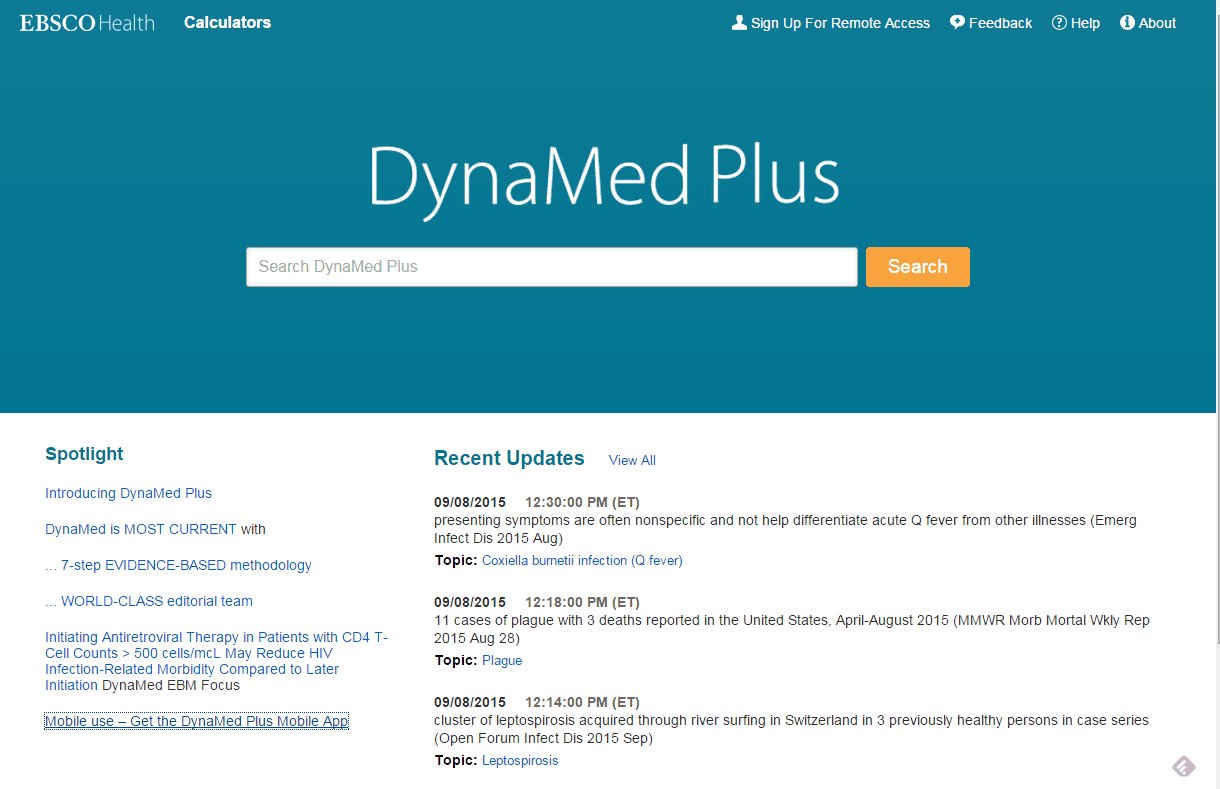
Hardin Library recently upgraded to DynaMed Plus (http://purl.lib.uiowa.edu/ebsco/dynamed).  DynaMed Plus features a new, cleaner interface, an improved search engine, and an easier-to-use navigation panel on the left side of each topic.  Topics now (or will soon) feature a section called Overview and Recommendations at the beginning, providing quick background information and graded, evidence-based management recommendations.  Longer, more in-depth information then follows. ICD-9 and ICD-10 codes are given for each condition and guidelines and patient information are available. Drug content, such as medication management and lab recommendations, is now provided by Micromedex. More than 4000 graphics and images are included in DynaMed Plus to aid diagnosis and treatment.

DMPlus

Dynamed Plus also has an improved mobile app, available for iOS and Android devices. Click on Mobile Use – Get the DynaMed Plus Mobile App in the lower left corner of DynaMed’s search page for more information.

For more information, contact your Hardin Library liaison or Hardin Reference staff at 319-335-9150 or lib-hardin@uiowa.edu.


DynaMed Upgraded to DynaMed Plus

Hardin Library recently upgraded to DynaMed Plus (http://purl.lib.uiowa.edu/ebsco/dynamed).  DynaMed Plus features a new, cleaner interface, an improved search engine, and an easier-to-use navigation panel on the left side of each topic.  Topics now (or will soon) feature a section called Overview and Recommendations at the beginning, providing quick background information and graded, evidence-based management recommendations.  Longer, more in-depth information then follows. ICD-9 and ICD-10 codes are given for each condition and guidelines and patient information are available. Drug content, such as medication management and lab recommendations, is now provided by Micromedex. More than 4000 graphics and images are included in DynaMed Plus to aid diagnosis and treatment.

DMPlus

Dynamed Plus also has an improved mobile app, available for iOS and Android devices. Click on Mobile Use – Get the DynaMed Plus Mobile App in the lower left corner of DynaMed’s search page for more information.

For more information, contact your Hardin Library liaison or Hardin Reference staff at 319-335-9150 or lib-hardin@uiowa.edu.


DynaMed Upgraded to DynaMed Plus

Hardin Library recently upgraded to DynaMed Plus (http://purl.lib.uiowa.edu/ebsco/dynamed).  DynaMed Plus features a new, cleaner interface, an improved search engine, and an easier-to-use navigation panel on the left side of each topic.  Topics now (or will soon) feature a section called Overview and Recommendations at the beginning, providing quick background information and graded, evidence-based management recommendations.  Longer, more in-depth information then follows. ICD-9 and ICD-10 codes are given for each condition and guidelines and patient information are available. Drug content, such as medication management and lab recommendations, is now provided by Micromedex. More than 4000 graphics and images are included in DynaMed Plus to aid diagnosis and treatment.

DMPlus

Dynamed Plus also has an improved mobile app, available for iOS and Android devices. Click on Mobile Use – Get the DynaMed Plus Mobile App in the lower left corner of DynaMed’s search page for more information.

For more information, contact your Hardin Library liaison or Hardin Reference staff at 319-335-9150 or lib-hardin@uiowa.edu.